
DUODMX GATEWAY

LIGHT IT UP.

 Highlights in DUODMX GATEWAY: 2 independent DMX interfaces  –  2 x 512 DMX channels  –  Bidirectional control  –  Programmable light sequences
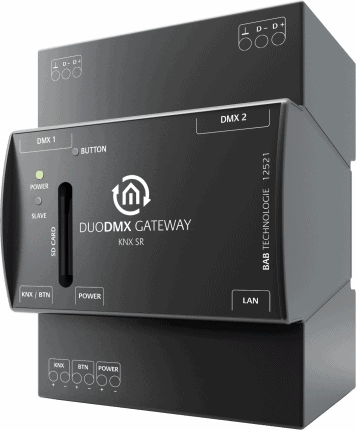
The DUODMX GATEWAY is an interface between KNX and the DMX world. Easy to configure and flexible in use.

LIGHT IT UP.

KNX & DMX – The DUODMX GATEWAY is an interface between KNX and the DMX world. Easy to configure and flexible in use. Two configurable DMX outputs, each with 512 channels, allow independent control of two DMX worlds. With the bidirectional SR variants you control DMX with KNX – and vice versa. Channels and scenes can be linked to KNX addresses simply by drag ‘n’ drop. The professional DMX configuration software “DMX Configurator” makes it possible. The DUODMX GATEWAY is available as a REG housing for installation in sub distribution. This makes the DUODMX GATEWAY perfectly suitable for retrofitting.

DUAL INTERFACES

KNX DMX. DMX KNX – The DUODMX GATEWAY has two separately controllable DMX interfaces. This means that two DMX worlds can be controlled independently of each other with one gateway at the same time. With the bidirectionality, you can use the gateway to control KNX devices via a DMX master. The master or slave operation can be set per interface.

CONFIGURABLE VIA DRAG ‘N’ DROP

The included DMX software „DMX-Configurator“ offers a fast and easy configuration. KNX group addresses can be linked to DMX channels and scenes simply and intuitively via Drag ‘n‘ Drop. In addition to all necessary DMX-specific settings, the software also offers a preview function, instantly displaying the created scenes in the connected DMX world. The final configuration data is conveniently transferred to the DUODMX GATEWAY via network.

MULTIFUNCTIONAL DIMMING

All DMX channels can be dimmed and switched individually or in groups. This allows you to change lighting scenes at any time as desired.
Relative and absolute dimming as well as switching on and off individual or several DMX channels enable optimum control via visualisation and/or KNX push-buttons. 3 and 4 byte values are also available for control with colour wheels. In addition, a soft on/off function is available for the first 128 DMX channels.

PROGRAMMABLE SEQUENCES

A popular feature of the DUODMX GATEWAY is its programmable sequences. Simply create the desired color impressions as sequences. The sequences run independently in DUODMX GATEWAY and can be called up at any time at the touch of a button. Created sequences can also be linked to each other. In addition to pressing a key, sequences can also be triggered via a potential-free contact input. In this way, you can implement simple “on-site” operation completely independent of the bus system.

EXAMPLE: DUODMX GATEWAY KNX SR – TYPE 12521
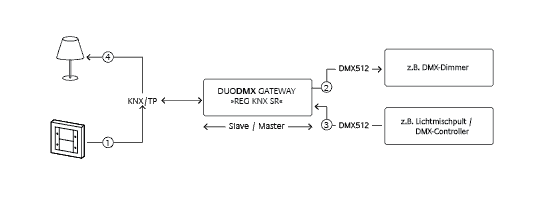
1) The DUODMX GATEWAY 12521 REG KNX SR is connected to the KNX bus and receives its control commands directly via the KNX bus. 2) The DMX packages for the DMX dimmers are then triggered. 3) The DMX mixing console (DMX master) is connected to the DUODMX GATEWAY (DMX slave). 4) The DMX packages are converted into KNX telegrams and sent to the KNX participants.

Bitte akzeptieren Sie YouTube-Cookies, um dieses Video abzuspielen. Wenn Sie dies akzeptieren, greifen Sie auf Inhalte von YouTube zu, einem Dienst, der von einer externen dritten Partei bereitgestellt wird.

YouTube-Datenschutzerklärung

Wenn Sie diesen Hinweis akzeptieren, wird Ihre Wahl gespeichert und die Seite wird aktualisiert.

Translated with www.DeepL.com/Translator (free version)

QUESTION ANSWER
The DUODMX GATEWAY is not found with the DMX Configurator. It may happen that the DMX Configurator software searches for existing DUODMX GATEWAYs in the network on a wrong network interface. In this case, no devices will be correctly displayed. The procedure here is to disable all unneeded network interfaces on the PC in use.
The DUODMX APP will not connect to the DUODMX GATEWAY. Check the names of the DMX participants (luminaires) with the DMX Configurator (Menu Device Manager) and shorten them to 10 characters if necessary.
The DUODMX GATEWAY does not send KNX/TP telegrams or stops sending them after a period of time. Check the power supply and replace it with a suitable model if necessary.
Note: The throttled voltage output of the KNX power supply must NOT be used.
Which EnOcean profiles (EEP) are supported? Supported EnOcean Profiles

"EnOcean Equipment Profiles" (EEP) that can be used with the DUODMX GATEWAY:


F6-01: Switch
F6-01-01: Push button

F6-02: Rocker switch, 2-way rocker
F6-02-01: Light and blind control (application type 1)
F6-02-02: Light and blind control (application type 2)
F6-02-03: Light control - application style 1
F6-02-04: Light and blind control ERP2

F6-03: Rocker switch, 4-gang rocker
F6-03-01: Light and blind control (application style 1)
F6-03-02: Light and blind control (application type 2)

F6-04: Position switch, home and office application
F6-04-01: Key card switches
F6-04-02: Key card switch (ERP2)

F6-05: Detectors
F6-05-00: Wind speed threshold switch
F6-05-01: Liquid leakage sensor (mechanic harvester)
F6-05-02: Smoke detector

FREE DOWNLOAD

The DUO DMX APP is available for iOS® and Android®.

  
A DUODMX GATEWAY is required to use the »DUO DMX APP«.